
GROM STORE GROM AUDIO shopping cart
home about products software news support installs docs distributors

Car Makes

Acura
Audi
BMW
Chrysler
Dodge
Ford
Jeep
Honda
Infiniti
Lexus
Lincoln
Mazda
Mercedes
Mercury
Nissan
Rover
Scion
SEAT
Skoda
Toyota
VW
Volvo
 

Products


News


Configuration file for GROM-USB2

Configuration file is a file named: GROMUSB2.CFG. Place it as shown below:
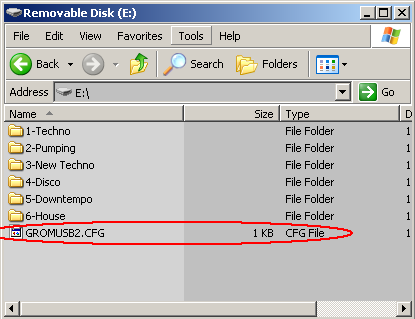
The format of the file: <CMD>= <VALUE> like: "s= d" or "s= 10" or "t= 45 65"
The following is a list of available options:
s SCAN mode options
d
directory jump mode
NEXT TRK or PREV TRK press in SCAN mode switch to the very first file in the next or previous directory
NUMBER (default 10) - file count jump mode NEXT TRK or PREV TRK press in SCAN mode will switch to a file number+ or - n
Example: s= d
s= 15
t symbol conversion
<FROM> <TO>
Where <FROM> ASCII symbol in HEX to be substituted with <TO>
Note that only ASCII symbols are converted ! Unicode, UTF-8/16/32 remain untouched !
Example: t= E0 61 which translate Russian "A" -> into latin "A"
v Volume adjustments
E0..FF
Volume for USB playback mode (not AUX!)
Adjusting values for v parameter allow to change volume of the MP3 playback. It will not affect iPod or AUX playback volume. Change only when you hear distortion or crackling !
Example: v= FF (full volume)
v= F0 (~3 db lower volume)
x Text zone address (BMW only)
0, 3B, 80, C0, E7
Text zone address when autodetection fails
Allow to use text when autodetection cannot find the proper address for the text display. Use this parameter only when you see no text in BMW ! Use value 0 when you need to disable text.
Example: x= 3B (navi)
x= 80 (regular radio)
x= 0 (disable text)

Config file example (download here). Translates Russian text into Latin and sets SCAN mode by directory.
s= d
t= E0 61
t= E1 62
t= E2 77
t= E3 67
t= E4 64
t= E5 65
t= B8 65
t= E6 7A
t= E7 7A
t= E8 69
t= E9 79
t= EA 6B
t= EB 6C
t= EC 6D
t= ED 6E
t= EE 6F
t= EF 70
t= F0 72
t= F1 73
t= F2 74
t= F3 75
t= F4 66
t= F5 68
t= F6 73
t= F7 63
t= F8 68
t= F9 63
t= FA 27
t= FB 79
t= FC 27
t= FD 65
t= FE 75
t= FF 61

Installs

Find some installs for most popular car makes. Videos and text versions available

learn more 

Tech Help

Here you can submit your support question

learn more 

Sign to Newsletter

Receive latest news about our products and services

 
Privacy Policy | Terms and Conditions | Copyright 2006-2010, GromAudio.com